Builders & Problem Solvers
At DoIT, we empower both professionals and student empoloyees by blending hands-on technical innovation with a deep commitment to continuous learning and professional development. Whether you are launching your career or refining your expertise, working with us means collaborating on meaningful campus solutions while building the high-demand skills needed for tomorrow.
Professional Staff Positions
A career with DoIT offers vibrant networking, professional development, and opportunities to stay connected locally through campus events and globally via higher ed tech communities like Internet2 and Educause.
UMBC Graduate and Undergraduate Student Positions
We invite students of all majors to explore career opportunities with DoIT! We have positions available year-round and encourage you to complete our DoIT Employment Interest Form. Hiring managers will review your qualifications and reach out to you directly if there’s a match.
Types of Student Employment Roles
Customer Support & Front-Facing
- Technology Support Center
- A/V Support & Operations
- Desktop Support
Infrastructure, Hardware, & Hands-on Networking
- A/V Installation
- Telecommunications
- Networking
Systems, Servers & Security
- High Performance Computing
- Unix Systems
- Windows Systems
- IT Security and Compliance
Data, Business Analysis & Project Administration
- Business Intelligence
- Electronic Forms (DocuSign)
- Project Management
- Communications & Outreach
Student Employees in the News
Showing items tagged respondus-lockdown-browser. Show All
Daily Training: LockDown Browser & Respondus Monitor
Training for Online Assessment Tools Provided by the Vendor
Posted: March 10, 2020, 1:22 PM
Welcome to 2019 - A New Year to Try These Tech Tools
Enhance your teaching toolbox with instructional technology!
Posted: January 28, 2019, 10:43 AM
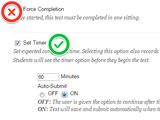
Avoid Use of Force Complete on Blackboard Tests
Recommendations incl. Timer, Auto Submit & Lockdown Browser
Posted: October 7, 2015, 11:52 AM
- Go to page 1
- …
- Go to page 5
- Go to page 6
- Go to page 7